Labels

Showing posts with label Bash. Show all posts

Thursday, August 18, 2011

Simple Bash command line to reduce the length of the fasta header lines.

Hi there, how many times we download a FASTA file that contains a huge and enormous fasta header like this:


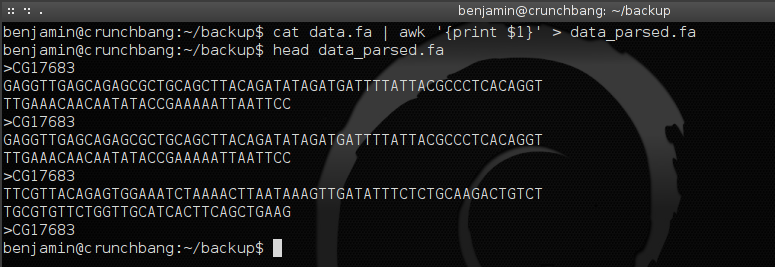
So, to clean up the header, just use this simple command line:

$ cat <input_file> | awk '{print $1}' > <output_file>


EXAMPLE:

$ cat data.fa | awk '{print $1}' > data_parsed.fa

And the output will be:


Hope this helps

Benjamin.

Saturday, July 30, 2011

MEME2fasta.sh <- Bash script to Parse MEME motifs into separated FASTA files

Hi, this script Parses motifs from MEME output files (meme.txt) and print them in separated FASTA formated files.

The script parses every *.txt meme output file inside the target folder where you run it to automatize the procedure.

You can download the script here: MEME2fasta.sh

NOTES: It works in Debian and Debian based Linux systems and I have not tested yet in another Linux distributions.

In order to run the script:

STEP 1 <- To execute it, just change the permission of the file to run as a program:

$ chmod +x MEME2fasta.sh

STEP 2 <- To run the program (you can copy and paste it inside your bin path or run the script locally):
# From the bin folder:
# Go to the path of the target meme.txt output files and then:

$ MEME2fasta.sh

# From the local folder (Which contain the script and the target meme.txt files)

$ ./MEME2fasta.sh


SHORT TUTORIAL

INPUT FOLDER AND INPUT FILES:


OUTPUT FOLDER AND OUTPUT FILES:


Code:

#!/bin/bash

# MEME2fasta.sh
#
# I used this script to parse the DNA sequences obtained 
# from each motif of MEME output files "meme.txt"
# to generate a single FASTA file per motif.

# Finally I used the FASTA files to build PWMs

# Author: Benjamin Tovar
# Date: 11 July 2011

###########################################################
# Parse the data that is among the line "BL MOTIF" and "//":
# to retrieve the DNA sequences that defines each motif
##########################################################

for meme_file in *.txt
    do
        sed -n '/BL   MOTIF/,/\/\//p' $meme_file > $meme_file.sed
    done;

##########################################################
# Split every DNA motif into separated files in "*.csplit"
# format
##########################################################

for sed_file in *.sed
    do
        csplit -z $sed_file '/^BL   MOTIF/' '{*}' --suffix="%02d.csplit" --prefix=$sed_file- -s
    done

##########################################################
# Parse the DNA sequences from each *.csplit files
##########################################################

for csplit_file in *.csplit
    do
        # grep -v '^$' <- delete blank lines
        # sed 's/1//g' <- deletes the number "1" from the line. 
        cut -c34-150 $csplit_file |grep -v '^$' | sed 's/1//g' > $csplit_file.cut
    done

##########################################################
# Generate Fasta files 
##########################################################

for cut_file in *.cut
    do
        pr -n:3 -t -T $cut_file | sed 's/^[ ]*/>/' | tr ":" "\n" | fold -w 100 > $cut_file.fa
    done

# remove unnecessary files:

rm *.sed | rm *.csplit | rm *.cut

# Rename the FASTA files

rename -f 's/\.csplit.cut.fa$/\.fa/' *.fa 

rename -f 's/.txt.sed//s' *.fa

exit;

# Benjamin Tovar

Benjamin

Wednesday, July 13, 2011

Bash tips: copy and move files avoiding the annoying "Argument list too long"

Hello there! Today I was into an interesting situation:

First: I had more than 80,000 GENBANK (*.gb) files inside a folder in combination with 100 FASTA files (*.fa) and 100 MAFFT alignment files (*.mafft).

Second: I wanted to create separated folders and then just create a list or summary of every kind of file with a simple:


# Create a summary of every FASTA file inside this folder:

$ ls *.fa | sort > fasta_summary


Third: Yep, it worked for the FASTA files and the MAFFT ones, but my life suddenly changed when I tried to use that code line for the GENBANK files because I got this -> "Argument list too long".

Ok I said, lets do it different, and finally here is the solution:

1) To create a summary of every genbank file inside the folder.


# be sure to be inside the folder with the Terminal
# Let Perl work ;)

$ perl -e 'opendir(DIR, "."); @all = grep /.gb/, readdir DIR; closedir DIR; print "@all\n";' | xargs ls > GENBANK_FILES_SUMMARY


grep/.gb/ <- Perl will look for that regular expression and list every file that have the ".gb" extension (you could  adapt the argument depending on your needs).


2) To copy every GENBANK file to a folder called "GENBANK_FOLDER-COPY":


$ find -name "*.gb" | xargs -i cp {} GENBANK_FOLDER-COPY/


3) To move every GENBANK file to a folder called "GENBANK_FOLDER":

$ find -name "*.gb" | xargs -i mv {} GENBANK_FOLDER/


# Description of the last line:

$ find source/ -name "*.txt" | xargs -i mv {} target/ <- Where "source/" is the input path and "target/" is the output path. "-name "*.txt" is the regular expression to look up for every *.txt file inside the input folder.

Check out the "cp" argument in task #2 and "mv" argument in task #3 for copying and moving respectively.

Hope this helps someone.

Benjamin

Monday, July 11, 2011

Bash script: Extract DNA sequences from each motif of MEME output files and parse them in FASTA format

This script parses the DNA sequences that conforms each motif in MEME output files ("meme.txt") and finally exports them in FASTA format.

MEME (Multiple EM for Motif Elicitation) program is a very powerful tool for motif mining in sequence datasets (This means that the program looks for overrepresented substrings with statistical significance among every sequence inside the dataset. A practical and common use is, for example, characterization in silico of motifs that could function as promoters upstream of a dataset constructed with CDS).

For more information about this program and other very useful Bioinformatics tools for motif mining tasks, take a look here in the MEME-suite home page.

So, with this script you will be able to extract every DNA sequence dataset that conforms each MEME motif.

The script is called extract-FASTA_from-MEME.sh 

To use it, just change the properties of the file to be executable:


$ chmod +x extract-FASTA_from-MEME.sh


and finally, just execute inside the folder that contains all the meme output files (meme.txt, meme.output.txt and so on):


$ ./extract-FASTA_from-MEME.sh


Code:

#!/bin/bash

# extract-FASTA_from-MEME.sh
#
# I used this script to parse the DNA sequences obtained 
# from each motif of MEME output files "meme.txt"
# to generate a single FASTA file per motif.

# Finally I used the FASTA files to build PWMs

# Author: Benjamin Tovar
# Date: 11 July 2011

###########################################################
# Parse the data that is among the line "BL MOTIF" and "//":
# to retrieve the DNA sequences that defines each motif
##########################################################

for meme_file in *.txt
do
    sed -n '/BL   MOTIF/,/\/\//p' $meme_file > $meme_file.sed
done;

##########################################################
# Split every DNA motif into separated files in "*.csplit"
# format
##########################################################

for sed_file in *.sed
do
csplit -z $sed_file '/^BL   MOTIF/' '{*}' --suffix="%02d.csplit" --prefix=$sed_file- -s
done

##########################################################
# Parse the DNA sequences from each *.csplit files
##########################################################

for csplit_file in *.csplit
do

# grep -v '^$' <- delete blank lines
# sed 's/1//g' <- deletes the number "1" from the line.
 
cut -c34-150 $csplit_file |grep -v '^$' | sed 's/1//g' > $csplit_file.cut
done

##########################################################
# Generate Fasta files 
##########################################################

for cut_file in *.cut

do
pr -n:3 -t -T $cut_file | sed 's/^[ ]*/>/' | tr ":" "\n" | fold -w 100 > $cut_file.fa
done

# remove unnecessary files:

rm *.sed | rm *.csplit | rm *.cut

# Rename the FASTA files

rename -f 's/\.csplit.cut.fa$/\.fa/' *.fa

# Benjamin Tovar

Benjamin

Wednesday, June 29, 2011

Bash script for split an input FASTA file into single files in FASTA format output

Hello everyone, yesterday I downloaded a FASTA file with more than 16,500 DNA sequences but I also need that every single sequence of that original FASTA file be split into 16,500 single files and each file must contain a single DNA sequence.

To do so, I write this short and simple script in bash called "fasta_split.sh".

To use the script:

$ ./fasta_split.sh

Here is an example, just follow the instructions the program ask you and that's all


Example input/output folders and input/output files:


 Code:

#!/bin/bash

#       fasta_split.sh
#       
#       2011 - Benjamin Tovar 
#       
#
# NAME OF THE PROGRAM: fasta_split.sh
# 
# DATE: 29/JUN/2011
# 
# AUTHOR: Benjamin Tovar
# 
# COMMENTS: This script will split a FASTA file that contains many sequences into
# Separated files containing one single sequence per file.
#
# I used this script to split a FASTA file containing ~16,500 sequences into
# ~16,500 independent files very quickly and simple.
#
################################################################################

# BEGINNING OF THE PROGRAM
echo
echo "This script relies on the program called \"csplit\" available in Linux/UNIX systems."

# Ask the user to type the name of the input FASTA file:
echo
echo -n "   Enter the name of the input file in FASTA format: "
    read input_file

# Ask the user to type the name of the output FASTA files (note in line 73, 
# "--suffix="%02d.fa" means that every output file will have the extension "*.fa"
# if you like to use another extension (for example, you like that every output file have
# the extension *.fasta), just replace the ".fa" with ".fasta" this way -> "--suffix="%02d.fasta"

# The part of "02" in "--suffix="%02d.fa" means that every file will be named with two numbers 
# sorted by their occurrence in the original FASTA input file.

# For example: in an input file that contains 2 sequences and with "--suffix="%02d.fa"
# the output will be:
#
# outputfile-00.fa
# outputfile-01.fa
#
# For example: in an input file that contains 2 sequences and with "--suffix="%04d.fa"
# the output will be:
#
# outputfile-0000.fa
# outputfile-0001.fa
echo      
echo -n "   Enter the name of the output files: "
    read output_file

# Ask the user to type the name of the output folder that will contain all the output files   
echo 
echo -n "   Enter the name of the output folder: "
read dir
echo
echo "Creating directory called \"$dir\"."

# Create the output folder
mkdir $dir

# Copy the input FASTA file to the output folder
cp $input_file $dir

# Open to the output folder
cd $dir
echo
echo "   ...splitting FASTA file ...saving them in \"$dir\"."

# Splitting the input FASTA file (For some settings, read line 31 to 49)
csplit -z $input_file '/^>/' '{*}' --suffix="%02d.fa" --prefix=$output_file- -s

# Delete the input FASTA file in the output folder
rm $input_file
echo
echo "Printing output summary in a file called \"OUTPUT-SUMMARY.out\""

# Create the output summary
ls | sort | sed -e 's/OUTPUT-SUMMARY.out//g' > OUTPUT-SUMMARY.out 
echo
echo " ---- PROCESS DONE ---- "
echo


Benjamin

Sunday, June 12, 2011

Firefox 4 Installer For Debian

Hello there, surfing in the "Internets" I found this bash script "install_firefox_debian.sh" written by AnonyMous.

So, if you use Debian or a Debian based distro like I do with #!Crunchbang Linux we can install Firefox 4 instead of the default Iceweasel.


#!/bin/bash
# FireFox 4 Installer For Debian 
# Open As Root 
# Wtite By AnonyMous :)

echo " Downloading FireFox "

wget http://mozilla.c3sl.ufpr.br/releases//firefox/releases/4.0.1/linux-i686/en-US/firefox-4.0.1.tar.bz2

# Install FireFox4 

echo " Installing FireFox 4.0.1 "

tar -xvjf firefox*.tar.bz2

sudo mv firefox /usr/local/firefox4

sudo ln -s /usr/local/firefox4/firefox /usr/local/bin/firefox4

echo " FireFox Installed Successfuly "


Benjamin